Scene Search
Intro
Scene search is a central component of the s1ard package. The Level-1 SLC/GRD source scenes and the ARD products are in a many-to-many relationship. One source scene is covered by multiple ARD products and an individual ARD product will in most cases be covered by two source scenes (see Figure 1).
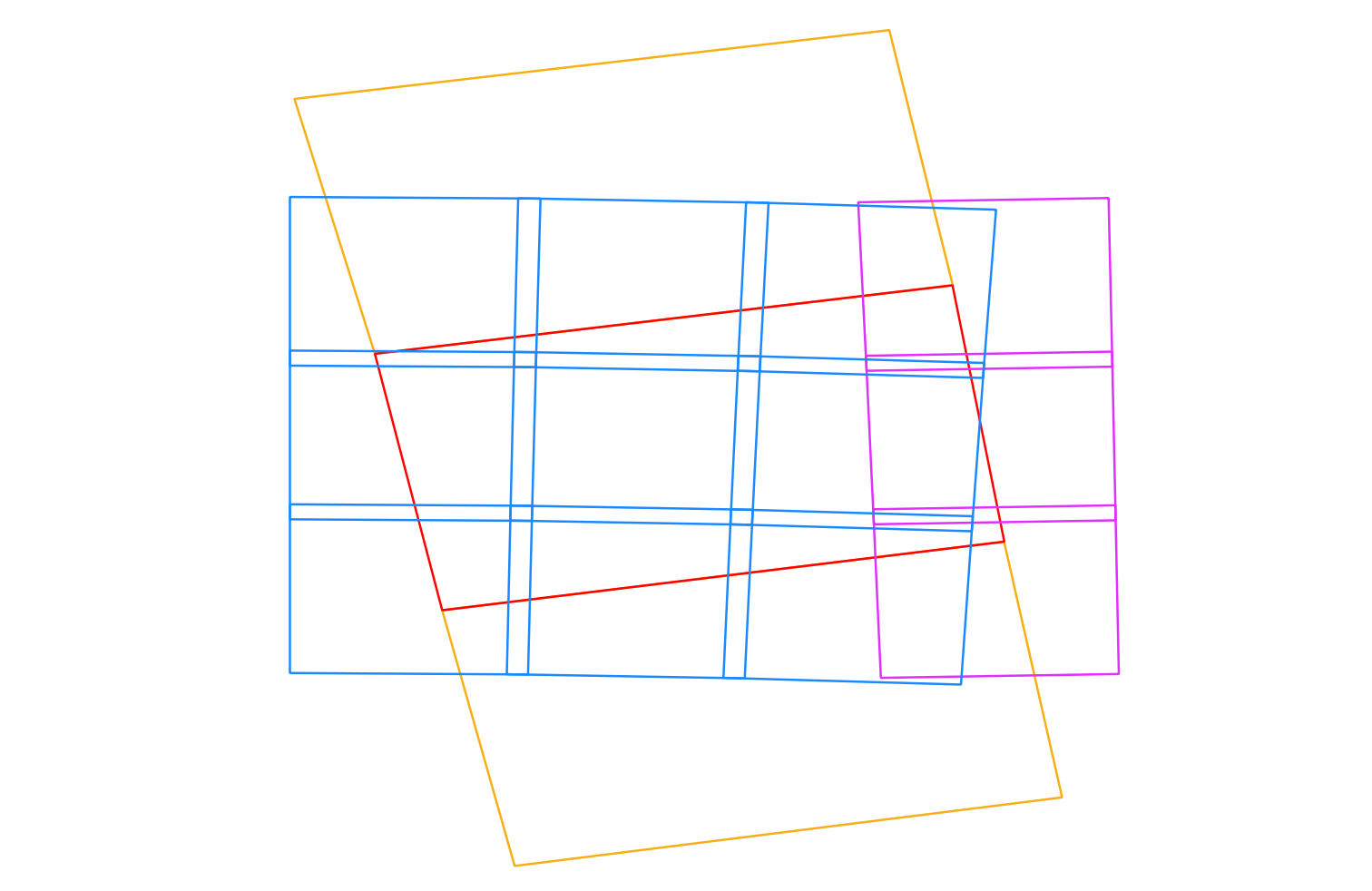
Figure 1: Comparison of one central source scene (red), all tiles covering this scene in two different UTM zones (blue, purple), and two neighboring scenes needed for full coverage of all displayed tiles (yellow).
Hence, the processor must ensure that all source scenes relevant for a number of ARD products are processed.
First, all locally available scenes are searched (see config.ini search options).
Then, a check is performed to ensure all scenes were actually found by checking the data take ID.
If the processor suspects a missing scene, it will cross-check with the ASF portal whether the scene is indeed missing.
See s1ard.search.check_acquisition_completeness().
Just providing a single scene to the processor is possible with the scene parameter, but this is only supported for mode=sar.
For the ARD modes, multiple scenes are needed and the processor will need to collect them via the defined search method and parameters.
Search configuration with config.ini
For Figure 1 we assume the following scene as the central one:
S1A_IW_GRDH_1SDV_20180829T170656_20180829T170721_023464_028DE0_F7BD
The following configuration in the config.ini file will select this central scene and its neighbors from the database and create 12 ARD products (as long as no geometry is defined via aoi_tiles or aoi_geometry).
The search parameters match the acquisition characteristics of the scene.
With date_strict we ensure that only scenes that were completely acquired in the defined time range are considered (i.e. not any earlier or later).
mindate = 20180829T170656
maxdate = 20180829T170721
date_strict = True
sensor = S1A
acq_mode = IW
product = GRD
scene_dir = path/to/scenes
db_file = scenes.db
Search with cesard.search
In the background the cesard.search module is used to do the scene search.
This module contains various tools for searching Sentinel-1 scenes from multiple sources.
For the scene search option above (via scene_dir and db_file), the function cesard.search.scene_select() and class pyroSAR.drivers.Archive are used for finding this scene and its neighbors:
from cesard.search import scene_select
from pyroSAR.drivers import Archive
from spatialist.ancillary import finder

# SQLite database used for search
db_file = 'scenes.db'

# a folder containing Sentinel-1 scenes
scene_dir = '/path/to/scenes'

# find the Sentinel-1 scenes in the defined folder
scenes = finder(target=scene_dir, matchlist=['S1*.zip'])

# create/open the database file
with Archive(dbfile=db_file) as archive:
    # insert the found scenes into the database
    archive.insert(scenes)
    # search for scenes and overlapping MGRS tiles matching the defined parameters
    selection, aoi_tiles = scene_select(archive=archive,
                                        sensor='S1A', acquisition_mode='IW',
                                        product='GRD', mindate='20180829T170656',
                                        maxdate='20180829T170721', date_strict=True)
print('\n'.join(selection))
print(aoi_tiles)
This will output the three scenes and the 12 tiles displayed above:
/path/to/scenes/S1A_IW_GRDH_1SDV_20180829T170631_20180829T170656_023464_028DE0_9F36.zip
/path/to/scenes/S1A_IW_GRDH_1SDV_20180829T170656_20180829T170721_023464_028DE0_F7BD.zip
/path/to/scenes/S1A_IW_GRDH_1SDV_20180829T170721_20180829T170746_023464_028DE0_5310.zip
['32TNR', '32TNS', '32TNT', '32TPR', '32TPS', '32TPT', '32TQR', '32TQS', '32TQT', '33TUL', '33TUM', '33TUN']
STAC API search
Note
Similarly, scene search can be conducted using STAC.
In the config.ini, the parameters scene_dir and db_file need to be replaced with stac_catalog and stac_collections:
stac_catalog = https://stac.terrabyte.lrz.de/public/api
stac_collections = sentinel-1-grd
Internally, the search interface class s1ard.search.STACArchive is used instead of pyroSAR.drivers.Archive as in the example above:
from s1ard.search import STACArchive

stac_catalog = 'https://stac.terrabyte.lrz.de/public/api'
stac_collection = 'sentinel-1-grd'

with STACArchive(url=stac_catalog, collections=stac_collection) as archive:
    selection, aoi_tiles = scene_select(archive=archive, ...
Basic scene search
Simple scene search (without selecting neighbors and MGRS tiles) can be done with the select methods of the respective driver classes.
pyroSAR
See pyroSAR.drivers.Archive.select().
from pyroSAR.drivers import Archive

db_file = 'scenes.db'
scene_dir = '/path/to/scenes'

with Archive(dbfile=db_file) as archive:
    selection = archive.select(sensor='S1A', acquisition_mode='IW',
                               product='GRD', mindate='20180829T170656',
                               maxdate='20180829T170721', date_strict=True)
print('\n'.join(selection))
STAC API
See s1ard.search.STACArchive.select().
Note
maxdate is increased by one second because the STAC catalog time stamp is more precise than the defined one and 2018-08-29T17:07:21Z < 2018-08-29T17:07:21.014592Z.check_exist=False is defined to not check the existence of the scene in the local file system.from s1ard.search import STACArchive
stac_catalog = 'https://stac.terrabyte.lrz.de/public/api'
stac_collection = 'sentinel-1-grd'
with STACArchive(url=stac_catalog, collections=stac_collection) as archive:
selection = archive.select(sensor='S1A', acquisition_mode='IW',
product='GRD', mindate='20180829T170656',
maxdate='20180829T170722', date_strict=True,
check_exist=False)
print('\n'.join(selection))
STAC geoparquet
See s1ard.search.STACParquetArchive.select().
Note
The same metadata content as for STAC API search is expected.
from s1ard.search import STACParquetArchive

parquet = '/path/to/*parquet'

with STACParquetArchive(files=parquet) as archive:
    selection = archive.select(sensor='S1A', acquisition_mode='IW',
                               product='GRD', mindate='20180829T170656',
                               maxdate='20180829T170722', date_strict=True,
                               check_exist=False)
print('\n'.join(selection))
ASF
See cesard.search.ASFArchive.select().
from cesard.search import ASFArchive

with ASFArchive() as archive:
    selection = archive.select(sensor='S1A', acquisition_mode='IW',
                               product='GRD', mindate='20180829T170656',
                               maxdate='20180829T170722', date_strict=True)
print('\n'.join(selection))